Clockworks Gateway
Bridge Pro DJ Link into Clockworks. Gateway connects to CDJs and DJ mixers on the network, translating their data into the Clockworks ecosystem.

How Gateway Works
Gateway sits between your Pro DJ Link network and Clockworks Viewer, translating deck information in real time.
Connect
Gateway discovers CDJs and DJ mixers on your Pro DJ Link network automatically.
Translate
Beat counters, BPM, track info, and transport state are translated into the CLX protocol.
Distribute
Clockworks Viewer receives the data and displays timecode across all your outputs.
Up to 6 Decks
Monitor and translate data from up to 6 CDJ decks simultaneously.
Waveform Support
Optional CLX waveform generation (better than pioneer ;))
Built-in Analyzer
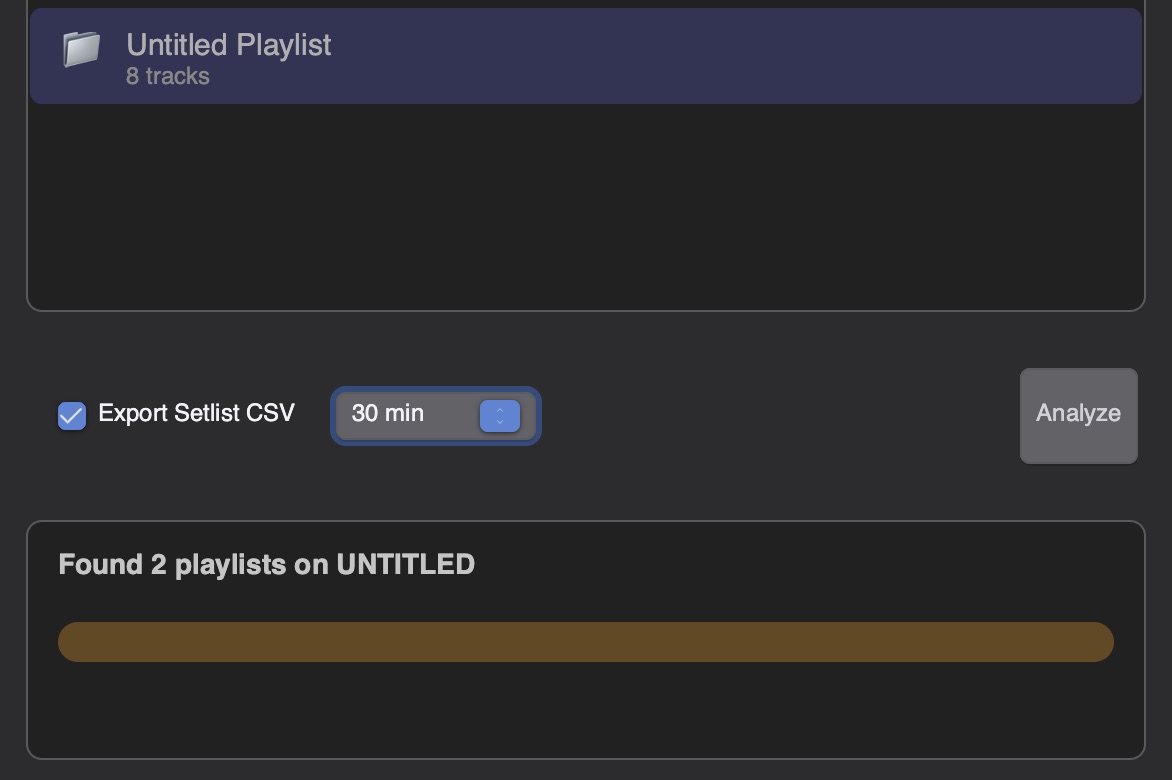
Plug in your USB drive, hit analyze, and quickly generate timecode offsets and waveforms right from any rekordbox playlist.
Built-in Analyzer
Plug in a USB drive, select a rekordbox playlist, and hit Analyze. Gateway generates timecode offsets and waveforms for every track, with optional setlist CSV export.
- Reads rekordbox USB playlists directly
- Generates timecode offsets and waveforms
- Export Setlist CSV for Viewer
- Configurable set length
High-Resolution RGB Waveforms
Pro DJ Link does not hand you waveform data. Gateway analyzes your rekordbox library ahead of the show and generates its own — full-color, frequency-mapped, and identical on every machine on the network.


Other solutions
- No waveform data exposed over Pro DJ Link
- Monochrome or low-detail rendering
- Appearance shifts between platforms
- Nothing to hand the lighting or video crew
Clockworks Gateway
- Full RGB waveforms with frequency mapped to color
- Generated in advance by the built-in Analyzer
- Pixel-identical on macOS and Windows
- Distributed to every Viewer on the network